How to Check Peugeot 408 Warning Lights and Displays
How to use the Peugeot 408 trip computer, counter reset, 10-inch touchscreen, i-Toggles, Energy app with e-SAVE and the MYPEUGEOT APP.
The 408 uses Peugeot's latest i-Cockpit layout: a compact steering wheel, a digital instrument panel that sits above it and a 10-inch touchscreen with i-Toggle shortcuts. This guide helps you get the most from it, from reading the trip computer and resetting the counters to using the Energy app and the plug-in hybrid's remote functions.
It's based on the official Peugeot 408 owner's handbook for the 408 fastback (2022 on).
Trip Computer
Instrument Panel
On the 408 you can display different tabs on the instrument panel, cycling through them by pressing the button on the end of the wiper control stalk. The instrument panel shows a range of operating and performance information.
Current Information Tab
This tab shows:
Current consumption (petrol): the car's instantaneous fuel consumption, giving you a sense of fuel efficiency.
Stop & Start time counter (petrol): how long Stop & Start has been active, helping you see how much it contributes to saving fuel.
Percentage of distance driven in fully electric mode (plug-in hybrid): the share of driving done in fully electric mode on plug-in hybrids.
Odometer (plug-in hybrid): the total distance covered by the plug-in hybrid.
Trip "1" and "2" Tabs
These tabs give more detail about your journeys:
Average speed: the car's average speed during the trip.
Average fuel consumption: average fuel consumption over the trip, giving you an idea of efficiency.
Distance travelled: the total distance covered during the trip.
Resetting the Trip Counters
Reset the Peugeot 408 Trip Counters
Resetting your trip data on the 408 is simple. With the trip you want displayed on the instrument panel, press and hold the button on the end of the wiper control stalk for more than 2 seconds. It's useful when starting a new journey or when you want to monitor the car's performance over a set period.
Trips "1" and "2" work independently and are reset the same way, so you can record data for two different journeys or periods and keep them separate.
Instrument Panel Definitions
Here are some of the most common values on the 408's instrument panel and what they mean:
Range

This shows how far you can drive on the fuel left in the tank, calculated from the average fuel consumption over the last few kilometres (or miles). Changes in your driving style or road conditions can change the figure. When the range drops below 30 km (or the equivalent in miles), dashes appear on the instrument panel. After adding at least 5 litres of fuel, the range is recalculated and shown once it exceeds 100 km. Dashes instead of figures can indicate a fault, in which case you should contact a PEUGEOT dealer or qualified workshop.
Current Consumption

Shows the car's fuel consumption over the last few seconds, displayed only at speeds above 30 km/h, so you can monitor your instantaneous consumption.
Average Consumption
Calculated since the trip computer was last reset, it shows the car's fuel efficiency over a longer period.
Average Speed

The car's average speed since the trip computer was last reset.
Distance Travelled

The total distance covered since the trip computer was last reset.
Stop & Start Time Counter

If your car has Stop & Start, this counter adds up the total time spent in STOP mode during the journey. It resets automatically every time you switch on the ignition.
10-Inch Touchscreen
Peugeot 408 System Features and Access
The 408 offers a wide set of system features for managing and controlling the car's functions, designed to maximise comfort, safety and entertainment for driver and passengers. Here's an overview:
Basic Access
Time and outside temperature: see the current time and the temperature outside at a glance.
Heating/air conditioning controls and settings reminders: adjust the cabin temperature and save your preferred settings.
Driving aid, comfort and safety functions: designed to improve safety and comfort on the move.
Audio and digital instrument panel settings: personalise the audio system and instrument panel.
Plug-in hybrid settings: manage the hybrid's specific features and functions.
Advanced Access
Visual manoeuvring aids: extra help when parking and manoeuvring.
Interactive owner's manual: detailed information about the car's features and functions.
Tutorial videos: visual guides showing how to use the car's features.
Audio and telephone controls: control the audio system and phone functions.
Connected services and related information: access to in-car internet features and connected services.
Navigation controls and information: navigation support for your journeys.
Voice commands: voice-controlled functions make driving safer and more relaxed.
Safety Warning
For safety reasons, carry out any operation that needs sustained attention only after stopping the car. Some functions are not available while driving, so it's best to stop safely first.
Recommendations
Recommendations for Using the Peugeot 408 Touchscreen and i-Toggles
The touchscreen and i-Toggles give you a modern, user-friendly way to reach the 408's functions. To use them effectively, keep the following in mind:
Using the Touchscreen
- The touchscreen and i-Toggles are capacitive screens, so don't use sharp objects on them.
- Don't touch the touchscreen with wet hands.
- Clean the screen with a soft, clean cloth.
Main Controls

Accessing the home pages: easily reach the home pages that give access to the car's functions and applications.
Returning to the first home page: quickly return to the first home page from anywhere.
Direct access to the air conditioning application: a shortcut takes you straight to the climate settings.
Driving Aids and Shortcuts

Direct access to driving aids: quickly reach the car's driving aid functions.
Quick settings list: swipe down from the top edge of the touchscreen to open the quick settings list, which includes settings such as brightness and diagnostics.
Scrolling text: scroll text with your finger, just like on a smartphone, with or without the contextual menu.
Show/hide the contextual menu: use the corresponding control to show or hide the contextual menu.
Going back: easily return to the previous page.
Function settings and extra information: press the corresponding line to change a function's status or see more information about it.
Adding/removing shortcuts: add or remove shortcuts as you need.
Volume and System Settings
Mute and volume: a short press mutes or restores the sound; turn to adjust the volume.
System on/off: with the ignition off, a short press switches the system on or off.
Standby mode: a long press activates standby mode, muting the sound and switching off the screens and clock display.
Applications

The Peugeot 408 Applications Wall and Its Features
The 408 comes with a range of applications that help you get the most from its technology. Here are the main ones and what they do:
Accessing the Applications Wall
Applications wall: press this button on the touchscreen to open the applications wall. Alternatively, press the touchscreen with three fingers from any page to display it.
ADAS (Advanced Driver Assistance Systems)
Driving aid functions: the ADAS application lets you activate, deactivate and configure the driving aids.
Air Conditioning
Temperature and air flow settings: adjust settings such as temperature and air flow. More detailed settings are available for features such as the dual-zone automatic air conditioning and heated steering wheel.
Seats
Seat comfort functions: activate, deactivate and configure the heating and massage functions. See the handbook for more on the heated seats and multi-point massage.
Settings
Main settings: adjust the car's core settings here, including the audio system, touchscreen, digital instrument panel, exterior lighting, vehicle access and safety functions.

Energy
Plug-in hybrid system features: access the plug-in hybrid's energy flow, consumption statistics, deferred charging and e-SAVE function.
For other applications not covered here, such as the audio and telematics systems, see your owner's handbook.
Energy Application
Peugeot 408 Energy Application Features
The 408 plug-in hybrid offers advanced features for managing and optimising energy. The Energy application brings them together in one place and helps you understand how the car uses energy. Its key features:
Energy Flow
Real-time display: shows the plug-in hybrid system working in real time, including the active driving mode, the petrol engine, the electric motor and the traction battery charge level.
Energy Flow Colour Codes
Blue: 100% electric energy.
White: energy from the petrol engine.
Green: energy recovery.
Statistics
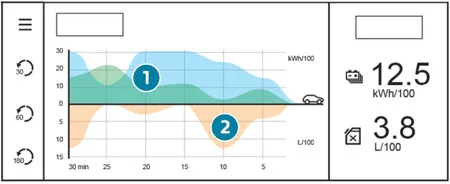
Average electricity and fuel consumption statistics: shows average electricity consumption (kWh/100 km) and average fuel consumption (l/100 km) for the current journey and past values. Energy consumption appears as two graphs: energy drawn directly from the traction battery (blue) and energy generated during deceleration and braking (green). Average fuel consumption is shown in orange.
Charging
Deferred charging: set up a deferred charging programme for the traction battery.
e-SAVE
Energy reserve function: e-SAVE lets you keep the traction battery's electrical energy for later, which is especially useful for driving in town or in zones reserved for electric vehicles.
Reserve options: once the function is active, choose the electric range to keep in reserve (10 km, 20 km or the full range, shown as MAX). Activation is confirmed by an indicator lamp in the instrument panel and the reserved energy shown in miles or km.
Using the reserve: to use the energy reserve, select Electric mode with the drive mode selector. If the distance you request is more than is available, the petrol engine starts recharging the traction battery up to the requested threshold, which can lead to higher fuel consumption.
i-Toggles
The Peugeot 408 i-Toggles Feature
The 408 has an innovative touchscreen system called i-Toggles. It comes with PEUGEOT i-Connect Advanced and lets you create personalised shortcuts for quick access to applications or presets.
Main Features
Additional touchscreen: i-Toggles are an extra screen alongside the main touchscreen, offering more personalisation.
Personalised shortcuts: by default, the shortcuts give quick access to the main applications such as Media, Air Conditioning, Navigation, Telephone and Mirror Screen.
Changeable shortcuts: you can change the shortcuts to suit your needs, for example a radio preset, a temperature preset, a preselected destination, a preselected contact or a preselected smartphone.
Personalisation: the i-Toggles personalisation options let you tailor the cabin experience to your own preferences.
Usage Tips
Exposure to sunlight: if the car is left in the sun for a long time, the touchscreen can overheat. Wait a few minutes for the screen to cool down before using the system.
Additional Remote Functions (Plug-in Hybrid)
Additional Remote Functions for the Peugeot 408 Plug-in Hybrid
The 408 plug-in hybrid offers advanced remote functions that make the car more efficient and convenient to use. You reach them from a smartphone through the MYPEUGEOT APP, so you can manage the car wherever you are.
Functions in the MYPEUGEOT APP
Traction battery charge management: plan and manage deferred charging from the app, choosing the best times to charge to save on energy costs and reduce environmental impact.
Thermal preconditioning management: make sure the cabin is at the temperature you want before you set off, which is especially welcome in cold weather.
Charge status and range: see the car's charge level and estimated electric range in real time.
Setup Procedure
Download the app: get the MYPEUGEOT APP from your smartphone's app store.
Create an account: create an account in the app.
Enter your VIN: enter your Vehicle Identification Number, found on your vehicle registration document.
Network Coverage
To use the remote functions, the car must be in an area with mobile network coverage. Outside coverage, for example in an underground car park, the app may not be able to connect to the car and will show a message saying so.
Make It a Habit
- Reset a trip counter at each fill-up or charge to track your real-world economy
- Customise the instrument panel display so the information you use most is always visible
- Keep the touchscreen and its software up to date. Our Peugeot software update guide explains how
- Don't adjust settings while you're driving: pull over first, or ask a passenger to do it
To understand what the panel is telling you, read What Do Peugeot 408 Warning Lights Mean? and our red and orange warning-light guides. For the full picture of the car, see our Peugeot 408 review.
Don't forget to follow us on Instagram for more Peugeot guides!
Related guides
On the 408, the warning lamps get all the attention, but the service, oil, temperature and hybrid readouts on the digital panel are just as useful. They give you early notice of what the car needs, so you can book a...
Most car buyers find the plug-in hybrid label confusing. Is it an electric car? Do you have to plug it in? With the Peugeot 408, the answers are "partly" and "you should". The two plug-in versions, the Hybrid 180 and...
The Peugeot 408 is hard to categorise: part fastback saloon, part crossover. Its engine range is just as varied, with conventional petrol, a 48-volt hybrid, two kinds of plug-in hybrid and, more recently, the fully...