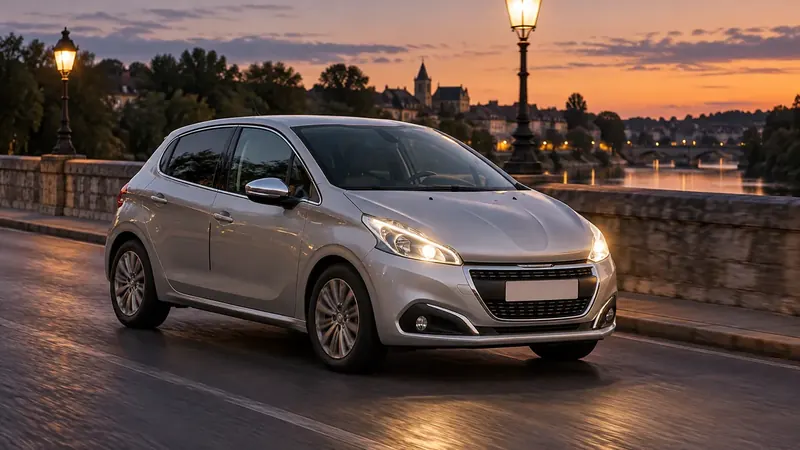
These functions light your way to and from the car.
Automatic guide-me-home lighting: with the ring in the "AUTO" position and in poor light, the dipped beam headlamps come on automatically when you switch off the ignition. You can activate or deactivate this function, and set how long it lasts, in the Driving/Vehicle touch screen menu.
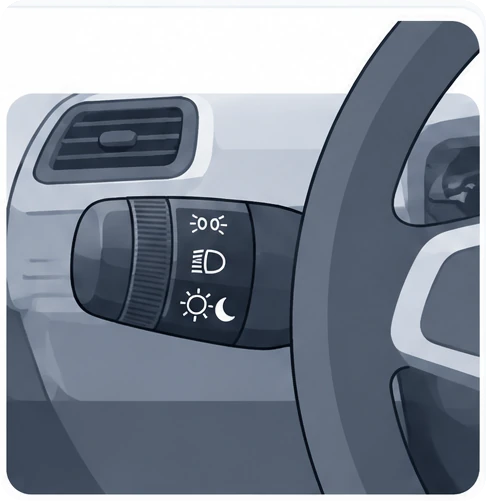
Manual guide-me-home lighting: with the ignition off, pull the stalk towards you ("headlamp flash") to activate or deactivate it. It goes off automatically after a period of time.
Welcome lighting: when you unlock the car in low ambient light with the "Automatic illumination of headlamps" function activated, certain exterior lamps and certain lamps in the passenger compartment switch on automatically. You can activate or deactivate it, and set its duration, in the Driving / Vehicle touch screen menu.
Door mirror spotlamps: these light the ground near the front doors. They come on automatically:
- when the car is unlocked
- when a door is opened
- when the remote control sends a request to locate the car
- with the welcome lighting and guide-me-home lighting functions
They go off automatically after 30 seconds.
Automatic lighting systems - General recommendations
The automatic lighting systems use a detection camera at the top of the windscreen.
The system may be disrupted or not work correctly:
- in poor visibility, such as snowfall or heavy rain
- if the windscreen in front of the camera is dirty, misted up or masked, for example by a sticker
- if the car is facing highly reflective signs or safety barrier reflectors
The system cannot detect:
- road users without their own lighting, such as pedestrians
- vehicles with hidden lighting, for example behind a safety barrier on the motorway
- vehicles at the top or bottom of a steep slope, on winding roads or at crossroads
Maintenance: clean the windscreen regularly, especially in front of the camera. The inside of the windscreen can mist up around the camera, so demist it regularly in humid and cold weather. Do not let snow build up on the bonnet or roof, as it could block the camera.
Automatic headlamp dipping
With the ring in the "AUTO" position and the function activated on the touch screen, this system switches between dipped and main beam headlamps automatically, depending on lighting and traffic conditions. It uses the camera at the top of the windscreen, so the general recommendations above apply.
This system is a driving aid. You remain responsible for your car's lighting, for using it correctly in the light, visibility and traffic conditions, and for following driving and vehicle regulations.
The system becomes operational above 16 mph (25 km/h) and stops working when the speed falls below 9 mph (15 km/h).
Activation/Deactivation: change the settings in the Driving/Vehicle touch screen menu. The system's state is stored when you switch off the ignition.
Operation:
- If the ambient light is very low and traffic allows, the main beam headlamps come on automatically and the matching indicator lamps light up on the instrument panel.
- If the ambient light is sufficient and/or traffic does not allow main beam, the dipped beam headlamps stay on and the matching indicator lamps light up.
- The function is deactivated when you switch on the foglamps, and reactivates automatically when you switch them off. Its indicator lamp goes out when the function is deactivated.
Pause: you can take over at any time.
- Pause the function: switch the headlamps manually between dipped and main beam. If the "AUTO" and "Dipped beam" indicator lamps were on, the system changes to main beam. If the "AUTO" and "Main beam" indicator lamps were on, it changes to dipped beam.
- Reactivate the function: switch the headlamps manually between dipped and main beam again.
Malfunction: if the system or camera fails, a warning lamp lights up on the instrument panel with an audible signal and a message. Have it checked by a PEUGEOT dealer or a qualified workshop.
Frequently Asked Questions
How do I turn on the rear foglamp on my Peugeot 208?
Switch on the dipped or main beam headlamps first, then rotate the ring on the lighting control stalk forwards. Rotate it backwards to turn the foglamp off.
Why don't my Peugeot 208 headlamps come on automatically in fog?
In fog or snow, the rain/sunshine sensor may detect enough light, so the lamps will not come on automatically. Switch them on manually in these conditions.
How do I switch on the parking lamps on a Peugeot 208?
Within one minute of switching off the ignition, move the lighting control stalk up or down depending on the traffic side. Return the stalk to the central position to switch them off.
Why has automatic headlamp dipping stopped working on my 208?
The function only works above 16 mph (25 km/h) and is deactivated when the foglamps are on. If a warning lamp comes on with a message, have the system checked by a PEUGEOT dealer or a qualified workshop.
Knowing how the lighting on your Peugeot 208 works helps you see clearly and be seen by others. Keep the windscreen clean in front of the camera and sensor, and for full details on any function, ask a PEUGEOT dealer or a qualified workshop.
More Peugeot 208 Guides
If a lighting warning lamp comes on, check our guides to the Peugeot 208 orange warning lights, the Peugeot 208 green and blue indicator lamps and the Peugeot 208 red warning lights.
Don't forget to follow us on Instagram for more Peugeot guides!
This is an independent guide, not an official Peugeot publication. If in doubt, contact a PEUGEOT dealer or a qualified workshop before carrying out any work.
Related guides: Peugeot 208 model guides; Peugeot 208 ii 2019 2023 bulb replacement.
Cover adapted from a photograph by Vauxford — Wikimedia Commons, CC BY-SA 4.0 (AI edited).