Hello and welcome. In this post, we'll look at the keys, doors and boot on the Peugeot 208 I (2015-present). It also covers the back-up procedures to use if the remote control or the central locking stops working. Some features, such as the alarm, folding door mirrors or the sunroof blind, depend on the version or equipment fitted, so your 208 may not have all of them.
How do I unlock my Peugeot 208 if the remote control battery is flat?
Insert the key in the door lock and turn it towards the front of the car to unlock it. You can then replace the CR1620 / 3 V battery and reinitialise the remote control.
Quick Reference
Scroll the table sideways.
Section
In short
Key with remote control
Lock, unlock, deadlock and locate the car
Central locking
Lock from inside, plus automatic locking while driving
Back-up procedures
Lock manually, change the battery, reinitialise remote
Boot
Open, close and unlock the boot by hand
Alarm
Arm, disarm and adjust the alarm monitoring
Electric windows
Window controls, anti-pinch and rear window lockout
Sunroof blind
Slide the blind back or forward by hand
Key with remote control
The key with remote control lets you lock or unlock your 208 centrally, either from the door lock or from a distance. It is also used to locate and start the car, and it provides theft protection.
Scroll the table sideways.
Button
Function
A
Unfolding/folding the key
B
Unlocking, disarming the alarm
C
Locking, locating the vehicle, arming the alarm
D
Guide-me-home lighting
Unfolding and folding the key: press button A to unfold or fold the key. If you do not press the button, you risk damaging the remote control.
Unlocking:
With the key: turn the key in the driver's door lock towards the front of the car.
With the remote control: press the unlock button. The direction indicators flash rapidly for a few seconds to confirm. Depending on version, the door mirrors unfold and the welcome lighting comes on.
Unlocking with the key does not deactivate the alarm.
Selective unlocking of the driver's door: complete unlocking is activated by default. If your car has a touch screen, you can set up selective unlocking from the Driving/Vehicle menu. One press of the unlock button then unlocks the driver's door only. Press it twice in quick succession to unlock the other doors and the boot.
Locking:
With the key: turn the key in the driver's door lock towards the rear of the car. Check that the doors and boot are fully closed.
With the remote control: press the lock button. The direction indicators light up fixed for approximately two seconds to confirm. Depending on version, the door mirrors fold.
If a door or the boot is still open, the central locking does not work. The car locks and then immediately unlocks, and you hear the locks make a rebound sound. If the car is unlocked but no door or the boot is opened, it locks itself again automatically after thirty seconds. You can deactivate the automatic folding and unfolding of the door mirrors in the vehicle's configuration menu.
Locating your car: press button C. A press switches on the car's lighting and flashes the direction indicators for a few seconds to help you find your car.
Guide-me-home lighting: make a long press on button D to switch on the sidelamps, dipped beams and number plate lamps. A second press before the end of the timed period cancels it.
Deadlocking: this deactivates the exterior and interior door controls as well as the central locking button on the dashboard. Never leave anyone inside the car when it is deadlocked.
To deadlock with the key:
First turn: turn the key to the rear in the driver's door lock.
Second turn: turn the key to the rear again within 5 seconds.
To deadlock with the remote control:
First press: press the lock button once to lock the car fully.
Second press: press the lock button again within 5 seconds.
The direction indicators light up fixed for approximately 2 seconds to confirm deadlocking. Depending on version, the electric door mirrors fold at the same time.
Advice on the remote control:
The high frequency remote control is a sensitive system. Do not operate it while it is in your pocket, as it could unlock the car without you knowing.
Do not keep pressing the buttons when you are out of range and out of sight of your car. The remote control might stop working, and you will then need to reinitialise it.
The remote control does not work when the key is in the ignition, even with the ignition switched off.
Anti-theft protection:
Do not make any modifications to the electronic engine immobiliser system, as this could cause malfunctions.
If your car has an ignition switch, remember to remove the key and turn the steering wheel to engage the steering lock.
Driving with the doors locked:
Locked doors could make it difficult for the emergency services to get into the car in an emergency.
With children on board, remove the key from the ignition when you leave the car, even for a short time.
Lost keys or remote control: go to a PEUGEOT dealer with the car's registration document, your personal identification documents and, if possible, the key code label. The dealer can retrieve the key code and transponder code needed to order a new key.
If you buy a second-hand 208, have the key codes memorised by a PEUGEOT dealer, so that only the keys you hold can start the car.
Central locking
You can lock and unlock the doors and boot from inside the car with the central locking button, and the car can also lock itself while you drive.
Lock: press the central locking button. The indicator lamp in the button comes on.
Unlock: press the button again to unlock the car completely. The indicator lamp goes off.
The indicator lamp also goes off when one or more doors are unlocked. The central locking does not work if a door is open.
If the car is deadlocked or locked from the outside, the button is not active. If the car is not deadlocked, use the remote control to unlock it, or pull an interior door handle to open a door.
Automatic locking (anti-intrusion security): the doors and boot can lock automatically when you drive above 6 mph (10 km/h). This function is activated by default. To switch it on or off, press the central locking button until you hear an audible signal and/or see a message on the screen.
Back-up procedures
These procedures let you lock and unlock your 208 when the remote control or the central locking is not working.
Total unlocking or locking with the key: use this if the remote control battery is flat, the remote control is faulty, or the car is in an area with strong electromagnetic interference. If the battery is flat, you can also replace it. If the remote control is faulty, you can also reinitialise it.
Insert: put the key in the door lock barrel.
Turn: turn the key towards the front of the car to unlock it, or towards the rear to lock it.
Deadlock: turn the key rearwards again within 5 seconds to deadlock the car.
The direction indicators light up for a few seconds to confirm the procedure has worked. If your car has an alarm, it is not activated when you lock with the key. If the alarm is activated, the siren sounds when you open the door. Switch on the ignition to stop it.
Central locking not working: use the following steps if there is a central locking fault, or if the battery is disconnected or discharged. With a central locking fault, the battery must be disconnected to lock the boot, so that the car is fully locked.
For the driver's door, turn the key towards the rear of the car to lock it, or towards the front to unlock it. To unlock a passenger door, pull the interior door opening handle.
To lock a passenger door:
Open: open the door.
Child lock: on the rear doors, check that the child lock is not activated.
Cap: remove the black cap on the edge of the door using the key.
Latch: insert the key into the hole without forcing it. Without turning the key, move the latch sideways towards the inside of the door.
Refit: remove the key and refit the black cap.
Check: close the doors and check from the outside that the car is locked.
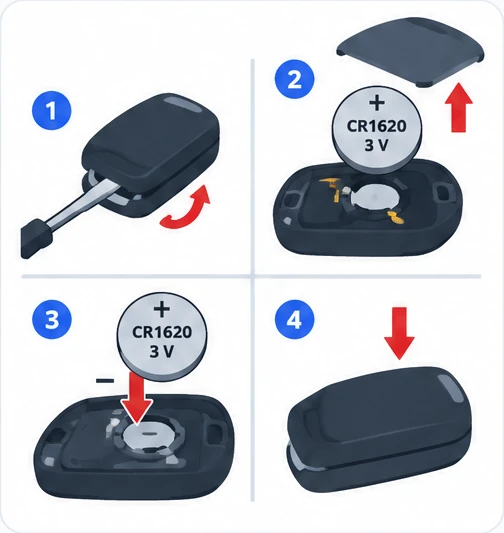
Changing the remote control battery: when the battery is flat, a warning lamp comes on, you hear an audible signal and a message appears on the screen. The battery reference is CR1620/3 volts.
Open the cover: insert a small screwdriver in the slot to unclip the cover, then raise it.
Remove: take the flat battery out of its housing.
Fit: insert the new battery the right way round and clip the cover back onto the housing.
Reinitialise: reinitialise the remote control.
Do not throw old remote control batteries away, as they contain metals that are harmful to the environment. Take them to an approved collection point.
Reinitialising the remote control: you may need to do this after replacing the battery or if the remote control develops a fault.
Ignition off: switch off the ignition.
Ignition on: turn the key to position 2 (Ignition on).
Press: press the closed padlock button for a few seconds.
Finish: switch off the ignition and remove the key from the switch.
The remote control is now fully working again.
Boot
Here is how to open and close the tailgate, and how to unlock the boot by hand if the central locking fails.
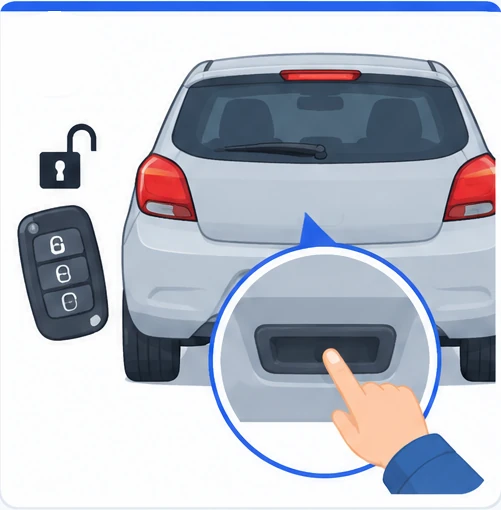
Open: unlock the boot or the car with the remote control or the key, press the opening control, then raise the tailgate.
Close: lower the tailgate using the interior grab handle.
Press down: if needed, press down on the tailgate to close it fully.
If the tailgate is not fully closed, a warning lamp comes on with an alert message for a few seconds when the engine is running. When you drive above 6 mph (10 km/h), the warning lamp comes on with an audible signal and an alert message for a few seconds.
If the tailgate is faulty or feels difficult to move when you open or close it, have it checked quickly by a PEUGEOT dealer or a qualified workshop. This stops the problem getting worse and prevents the tailgate from dropping and causing serious injuries.
Backup control: this lets you unlock the boot mechanically if the central locking is not working.
Access: fold the rear seats to reach the lock from inside the boot.
Insert: insert a small screwdriver into hole A of the lock to unlock the boot.
Release: move the latch to the left.
With a central locking fault, you must disconnect the battery to lock the boot, so that the car is fully locked.
Alarm
The alarm protects your 208 against theft and break-ins. It provides two types of monitoring:
Exterior perimeter: the alarm goes off if anyone tries to open a door, the boot or the bonnet.
Volumetric: the alarm goes off if anyone breaks a window, enters the passenger compartment or moves inside the car.
The system also protects itself: the alarm goes off if the battery, button or siren wiring is disconnected or damaged. For any work on the alarm system, contact a PEUGEOT dealer or a qualified workshop.
Activating the full alarm:
Get out: switch off the ignition and get out of the car.
Lock: lock or deadlock the car with the remote control.
When monitoring is active, the indicator lamp in the alarm button flashes once per second and the direction indicators come on for about 2 seconds. Exterior perimeter monitoring starts after 5 seconds and interior volumetric monitoring after 45 seconds. If a door, the boot, the bonnet or another opening is not closed properly, the car does not lock, but exterior perimeter monitoring starts after 45 seconds, at the same time as interior volumetric monitoring.
Deactivating the alarm: press the unlock button on the remote control. The indicator lamp goes off and the direction indicators flash for about 2 seconds. If the car locks itself again because no door or the boot was opened within 30 seconds of unlocking, monitoring is reactivated automatically.
When the alarm goes off: the siren sounds and the direction indicators flash for 30 seconds. Monitoring stays active until the alarm has been triggered ten times in a row. When you unlock with the remote control, rapid flashing of the indicator lamp tells you the alarm went off while you were away. The flashing stops as soon as you switch on the ignition.
Exterior perimeter monitoring only: switch off interior volumetric monitoring to avoid false alarms when you leave a pet in the car, leave a window partly open, wash the car, change a wheel, have the car towed or transport it by ship.
Deactivate: switch off the ignition and, within ten seconds, press the alarm button until the indicator lamp stays on fixed.
Get out: get out of the car.
Lock: lock the car straight away with the remote control.
Only exterior perimeter monitoring is now active, and the indicator lamp flashes once per second. You need to repeat this each time you switch off the ignition.
Reactivating interior volumetric monitoring:
Unlock: unlock the car with the remote control to switch off exterior perimeter monitoring.
Re-arm: activate the alarm system in the normal way.
Locking without the alarm: lock or deadlock the car with the key (built into the remote control) in the driver's door lock.
If the remote control fails:
Unlock: unlock the car with the key in the driver's door lock.
Open: open the door. This sets off the alarm.
Ignition on: switch on the ignition. The alarm stops and the indicator lamp goes off.
Operating fault: if the indicator lamp stays on fixed when you switch on the ignition, the system is faulty. Have it checked by a PEUGEOT dealer or a qualified workshop.
Electric windows
The electric window switches let you open and close each window, and lock out the rear controls for children's safety.
Scroll the table sideways.
Control
Function
1
Left-hand front window
2
Right-hand front window
3
Right-hand rear window
4
Left-hand rear window
5
Deactivation of the rear seat window controls
Manual operation: press or pull the switch gently, without going past the point of resistance. The window stops as soon as you release the switch.
Automatic operation: press or pull the switch fully, past the point of resistance. The window opens or closes completely when you release the switch. Press the switch again to stop the window.
The switches keep working for approximately 45 seconds after you switch off the ignition. After that, switch the ignition on again to use them.
Safety anti-pinch: if a rising window meets an obstacle, it stops and immediately lowers part of the way. To reset normal operation:
Open: press the switch until the window opens completely.
Close: pull the switch straight away until the window closes fully.
Hold: keep holding the switch for approximately one more second.
The anti-pinch function is not active during this operation.
Deactivating the rear window controls: press control 5 to deactivate the rear window controls, whatever position the windows are in. The red indicator lamp in the button comes on with a confirmation message, and stays on while the deactivation is in place. You can still operate the rear windows from the driver's controls.
Reinitialising after battery reconnection: the anti-pinch function must be reinitialised, and it is not active during these steps. For each window:
Down and up: bring the window down completely, then back up. It rises a few centimetres each time, so repeat until the window is fully closed.
Hold: keep pulling the switch for at least one second after the window reaches the closed position.
If someone gets trapped while a window is moving, press the switch to reverse the window. Take particular care with children when operating the windows.
Sunroof blind
The sunroof blind is moved by hand using its handle.
Opening: take the blind by its handle and push it rearward to the position you want.
Locking: take the blind by its handle and pull it forward to the position you want.
Frequently Asked Questions
How do I unlock my Peugeot 208 if the remote control battery is flat?
Insert the key in the door lock and turn it towards the front of the car to unlock it. You can then replace the CR1620/3 volts battery and reinitialise the remote control.
Why does my Peugeot 208 lock and then unlock straight away?
A door or the boot is still open, so the central locking does not work. The car locks and immediately unlocks, and you hear the locks make a rebound sound.
How do I reset the one-touch electric windows on my Peugeot 208?
Bring each window fully down and then up, repeating until it is closed, and keep pulling the switch for at least one second after it closes. You need to do this after the battery has been reconnected.
Can I leave my dog in the Peugeot 208 without setting off the alarm?
Yes, switch off the interior volumetric monitoring before you lock the car, so only exterior perimeter monitoring is active. You need to do this each time you switch off the ignition.
Knowing how the key, locks, alarm and windows work on your Peugeot 208 makes everyday use simpler, and the back-up procedures mean you can still lock and unlock the car if something stops working. Keep this guide handy, and for full details, ask a PEUGEOT dealer or a qualified workshop.
Don't forget to follow us on Instagram for more Peugeot guides!
This is an independent guide, not an official Peugeot publication. If in doubt, contact a PEUGEOT dealer or a qualified workshop before carrying out any work.
BlueHDi Diesel engines on the Peugeot 208 use AdBlue to clean up their exhaust gases. This guide explains what the SCR system does, how far you can drive on a tank of AdBlue, how to store and handle the fluid s…
A flat 12 V battery is one of the most common reasons a car will not start. This guide explains how to reach the battery on your Peugeot 208, how to start the engine using another battery or a booster, how to c…
Your Peugeot 208 can warn you when one or more tyres lose pressure. This guide explains how the under-inflation detection system works, what to do when the alert comes on, how to reinitialise the system and whe…