Hello and welcome. In this post, we'll look at the key battery, keyless entry and how to open the boot on the Peugeot 3008 III (2024-2025). It covers the electronic key and remote control, Proximity Keyless Entry and Start, central locking, the back-up procedures, the boot, the alarm, the electric windows and the panoramic sunroof. The guide covers the Peugeot 3008 III (2024-2025), including vehicles produced from 02/09/2024. Several features depend on the version or equipment fitted, so your 3008 may not have all of them.
How do you change the key battery on a Peugeot 3008 III?
Unclip the key cover or emergency key blade, note the battery type on the holder, and fit a new battery the same way round as the old one.
Quick Reference
Scroll the table sideways.
Section
In short
Electronic key with remote control function and built-in key
Remote control functions, unlocking, locking, deadlocking and locating
Proximity Keyless Entry and Start
Hands-free unlocking and locking by detecting the key
Central locking
Locking from inside and automatic locking while driving
Back-up procedures
Lost keys, manual locking, key battery and reinitialising
Boot
Opening, closing and manually unlocking the tailgate
Alarm
Alarm monitoring types, activation, deactivation and triggering
Electric windows
Window switches, anti-pinch, rear lock and reinitialising
Panoramic sunroof
Sunroof and blind controls, precautions and reinitialising
Electronic key with remote control function and built-in key
Your electronic key works as a remote control and also holds a built-in key. Depending on version, the remote control lets you:
Unlock, lock and deadlock the car.
Unlock, open, close and lock the boot.
Fold and unfold the door mirrors.
Activate and deactivate the alarm.
Locate the car.
Close the windows.
Close the sunroof.
Activate the electronic immobiliser.
If the remote control, the central locking or the battery fails, back-up procedures let you lock and unlock the car. You will find them in the Back-up procedures section below.
Built-in key: depending on version, you use it to activate or deactivate the manual child lock, activate or deactivate the front passenger airbag, and lock or unlock the doors as a back-up. To eject the key or put it back, pull and hold the button. Once you have ejected the key, always keep it with you so you can carry out the back-up procedures.
Unlocking: you set selective unlocking (driver's door, boot) in the Settings > Vehicle touch screen application. If selective unlocking is deactivated, one press of the unlocking button unlocks the whole car. With selective unlocking activated:
First press: unlocks the driver's door and the fuel filler flap (Petrol or Hybrid), or the driver's door and the charging flap (Rechargeable hybrid or Electric).
Second press: unlocks the other doors and the boot. You can also unplug the charging nozzle at this point.
The direction indicators flash and the daytime running lamps come on to confirm unlocking. Depending on version, this also confirms that the alarm is deactivated, and the door mirrors unfold.
Tailgate: by default, selective unlocking of the tailgate is deactivated and motorised operation is activated. Press and hold the tailgate button on the remote control to unlock the boot. With a motorised tailgate, this triggers motorised opening. With a non-motorised tailgate, it partially opens the tailgate. If motorised operation is deactivated, pressing the button partially opens the tailgate. When selective unlocking of the tailgate is activated, the doors and the fuel filler flap stay locked. If the car has not been fully unlocked, the tailgate relocks automatically after you close it. If selective unlocking of the tailgate is deactivated, the button unlocks the whole car. You must close the tailgate again before you can lock the car.
Locking: with the ignition off, press the locking button. The direction indicators light up to confirm locking and, depending on version, alarm activation. On some versions the door mirrors fold. Depending on version, you can switch the lock audible signal on or off in Settings > Vehicle. A door or boot that is not properly closed prevents locking, but if your car has an alarm, the alarm activates after 45 seconds. If you unlock the car but do not open a door or the boot, it locks itself again after about 30 seconds. If an alarm is fitted, it is reactivated automatically.
Deadlocking: deadlocking stops the interior door controls and the central locking button from working. The horn still works. Never leave anyone inside the car when it is deadlocked.
Lock: with the ignition off, press the locking button.
Deadlock: press the locking button again within 3 seconds. The direction indicators light up briefly to confirm.
On cars with Proximity Keyless Entry and Start, a double audible signal tells you the car is not deadlocked.
Closing the windows and sunroof: press the locking button for more than 2 seconds to close the windows completely and, depending on version, the sunroof. An audible signal sounds inside the car before anything moves, to warn any occupants. Press again to stop the closing. Make sure no person or object can block the windows or sunroof. On versions with an alarm, if you want to leave the windows or sunroof partly open, first deactivate the interior volumetric protection (see the Alarm section).
Locating the car: with the car locked, make a short press on the locating button. The direction indicators flash for approximately 10 seconds, and the door mirror spotlamps and courtesy lamps come on.
Advice:
The remote control is a sensitive high-frequency device. Avoid handling it in your pocket, because you could unlock the car without meaning to.
Avoid pressing the buttons when you are out of range of the car. This could stop the remote control from working, and you would then need to reset it.
Do not modify the electronic immobiliser, as this might cause malfunctions.
Driving with the doors locked could make it harder for the emergency services to get into the car in an emergency.
Take the electronic key with you whenever you leave the car, even for a short time.
Proximity Keyless Entry and Start
Proximity Keyless Entry and Start unlocks and locks the car simply by detecting the electronic key. As long as you carry the key, the car unlocks as you approach and locks when you walk away. It uses three recognition zones:
Scroll the table sideways.
Zone
What happens
Distance from the car
A
Welcome lighting as you approach
Between 2 and 5 metres
B
Automatic locking as you move away
About 2 metres
C
Automatic unlocking as you approach
Between 1 and 2 metres
You set the automatic functions, and selective unlocking (driver's door, boot), in the Settings > Vehicle touch screen application.
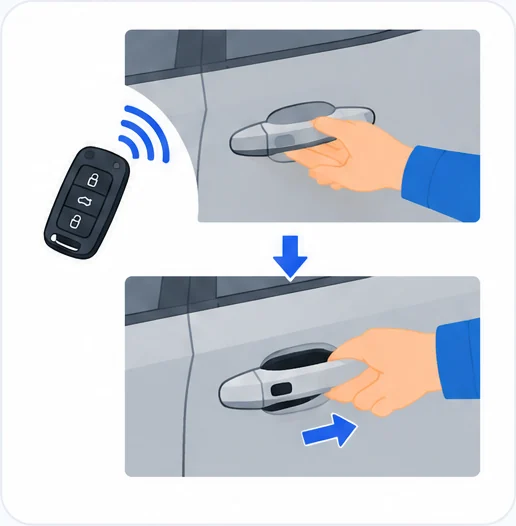
Complete unlocking: the doors and boot unlock automatically when you enter zone C, if the automatic functions are activated. You can also gently press the driver's door handle or the button on the boot. The direction indicators flash and the daytime running lamps come on to confirm unlocking. Depending on version, this also confirms that the alarm is deactivated, and the door mirrors unfold.
If the key stays around the car (zones A, B or C) for more than 15 minutes without any action, the automatic functions are deactivated. Use the remote control or press the driver's door handle instead. If the door handle does not lock or unlock the car, bring the key closer and try again.
Selective unlocking of the driver's door: this works automatically as you approach the driver's door, if the automatic functions are activated, or when you gently press the driver's door handle. It unlocks the driver's door and the fuel filler flap (Petrol or Hybrid), or the driver's door and the charging flap (Rechargeable hybrid or Electric). Once you are inside with the driver's door closed, press the central locking button twice or pull the opening control on any door to unlock everything.
Selective unlocking of the tailgate: the tailgate unlocks automatically as you approach the rear of the car. Press the tailgate control to open the boot. The doors stay locked. If the car has not been fully unlocked, the tailgate relocks automatically after you close it.
Locking: with the ignition off and the doors and boot closed, the car locks automatically when you leave zone B, if the automatic functions are activated. You can also gently press the driver's door handle. The direction indicators light up to confirm, and a double audible signal sounds when the car locks as you walk away. You cannot lock the car if the key is left inside. Depending on version, you can switch the lock audible signal on or off in Settings > Vehicle.
Deadlocking: deadlocking stops the interior door controls and the central locking button from working. The horn still works. Never leave anyone inside the car when it is deadlocked.
Lock: with the ignition off, gently press the driver's door handle.
Deadlock: press the handle again within 3 seconds. The direction indicators light up briefly to confirm.
A double audible signal tells you the car is not deadlocked.
Advice:
Central locking will not take place if a door or the boot is still open, or if the key has been left inside the car.
If you unlock the car but do not open a door or the boot, it locks itself again after about 30 seconds. If fitted, the alarm is reactivated automatically (if it was previously activated).
With a motorised tailgate, the car locks automatically after the tailgate closes completely, even if the key is outside the recognition zones.
You set automatic folding and unfolding of the door mirrors in the touch screen.
Never leave the car without the key, even for a short time.
There is a risk of theft if the key is in one of the recognition zones while the car is unlocked.
To save the key battery and the car's battery:
Unlocking on approach (zone C) switches to hibernation mode after several days (approximately one week) without use. Use the remote control or press the driver's door handle to unlock. The automatic unlocking and locking functions come back the next time you start the car.
If the welcome lighting is triggered several times in a row without the car being started, it is deactivated.
All hands-free functions switch to hibernation mode after 21 days without use. To restore them, unlock the car with the remote control and start the engine. The door mirrors unfold only when the ignition is switched on.
Central locking
The central locking button lets you lock and unlock the doors and boot from inside the car.
Manual locking: press the button. The indicator lamp comes on to confirm central locking. Central locking does not take place if any door is open.
When the car is locked or deadlocked from outside, the indicator lamp flashes and the button does not work. After normal locking, pull one of the interior door controls to unlock the car. After deadlocking, you must use the remote control, the Keyless Entry and Start system or the built-in key.
Automatic locking (anti-intrusion security): the doors and boot lock automatically when you drive above 6 mph (10 km/h). This is activated by default. To deactivate or reactivate it, press the central locking button until a confirmation message appears.
Back-up procedures
These procedures help when a key is lost or when the remote control, central locking or battery fails.
Lost keys: go to a PEUGEOT dealer with the car's registration certificate, your personal identification documents and, if possible, the label with the key code. The dealer can retrieve the key code and the transponder code so that a new key can be ordered.
Unlocking or locking the whole car with the key: use this procedure if the remote control battery is flat, the remote control is faulty, the car's battery is flat, or the car is in an area with strong electromagnetic interference. If the remote control battery is flat, change it. If the remote control is faulty, reinitialise it. Both are explained below.
Remove the cover: insert the key in the notch of the lock cover and remove the cover.
Insert the key: put the key into the door lock.
Turn the key: turn it towards the front or the rear to unlock or lock the car.
If your car has an alarm, locking with the key does not activate it. If the alarm is activated, the siren sounds when you open the door. Switch on the ignition to stop it.
Central locking not working: use the following procedures if the central locking is faulty or the battery is disconnected or flat. If the central locking is faulty, you must disconnect the battery to make sure the car is fully locked.
For the front left-hand door, insert the key into the lock and turn it towards the front or rear of the car to lock or unlock the door. To unlock the other doors, pull the interior door opening control. To lock the other doors:
Open the doors: open each door you want to lock.
Check the child lock: on the rear doors, make sure the child lock is not on.
Turn the latch: gently insert the key into the latch in the door lock, then turn the latch an eighth of a turn towards the outside of the door.
Close and check: close the doors and check from outside that the car is locked.
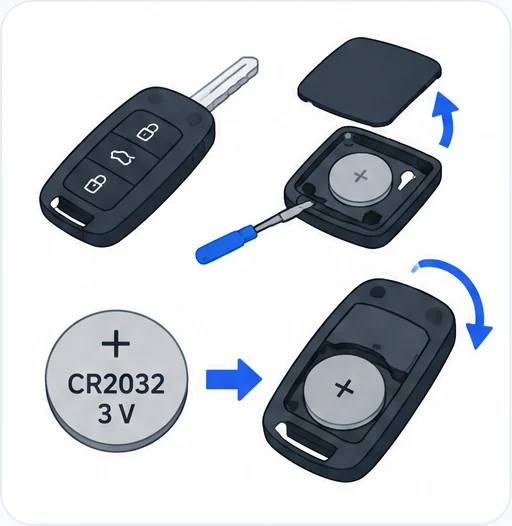
Changing the remote control battery: a message appears on the instrument panel when the battery needs changing. The battery type is CR2032/3 volts.
Open the cover: insert a small screwdriver in the slot to unclip the cover, then lift it.
Remove the old battery: take the flat battery out of its housing.
Fit the new battery: put the new battery in, respecting the polarity. Start by inserting it into the contacts in the corner.
Close the cover: clip the cover back onto the unit.
Reinitialise: reinitialise the remote control as described below.
Take used batteries to an approved disposal point, as they contain metals that are harmful to the environment. Button-battery safety:
Do not swallow the battery. It can cause chemical burns and serious internal burning in only 2 hours, and can be fatal.
If a battery has been swallowed or put into any part of the body, get medical advice immediately.
Keep new and used batteries out of the reach of children.
If the battery compartment does not close properly, stop using the remote control and keep it away from children.
Replace the battery only with the same type. An incorrect type risks explosion.
Do not use, store or leave the battery somewhere with extremely high temperatures or extremely low pressure due to very high altitude, as there is a risk of explosion or leaking of inflammable liquid or gas.
Do not burn, crush or cut a used battery.
Reinitialising the remote control: you may need to do this after changing the battery or if there is a fault.
Open the car: use the mechanical key in the lock.
Use the back-up reader: hold the electronic key against the back-up reader on the steering column until the ignition is switched on.
Press the brake: with an automatic gearbox or drive selector, in mode P, press the brake pedal.
Switch on: press the START/STOP button to switch on the ignition.
If the fault persists after reinitialisation, contact a PEUGEOT dealer or a qualified workshop without delay.
Opening the doors: from outside, pull the door handle once the car is unlocked or when the Keyless Entry and Start key is in the recognition zone. From inside, pull the interior opening control of any door to unlock the car completely. With selective unlocking activated, opening the driver's door unlocks only the driver's door, if the car has not already been completely unlocked.
Boot
The tailgate opens from the central control on the outside of the boot.
Press the control: with the car unlocked, or with the electronic key in the recognition zone, press the central tailgate control.
Raise the tailgate: lift it open.
When selective unlocking is activated, the key must be close to the rear of the car. Check that there is enough space for the tailgate to move. The tailgate is not designed to hold a bicycle carrier.
Closing:
Lower it: pull the tailgate down using the interior grips.
Close it: release the grips and press down on the outside of the tailgate.
If the tailgate is faulty or difficult to open or close, have it checked by a PEUGEOT dealer or a qualified workshop without delay. This stops the problem getting worse and avoids the risk of the tailgate dropping, which could cause serious injury.
Back-up release: use this to unlock the boot manually if the battery or central locking fails.
Reach the lock: fold the rear seats to reach the lock from inside the boot.
Unlock: insert a small screwdriver into hole A of the lock.
Move the latch: slide the latch to the left.
Alarm
Depending on version, your 3008 has an alarm that protects against theft and break-ins and acts as a deterrent. It has four types of monitoring:
Exterior perimeter: triggers if anyone tries to open a door, the boot or the bonnet, for example.
Interior volumetric: triggers if anyone breaks a window, enters the passenger compartment or moves inside the car.
Anti-tilt: triggers if the car is lifted or moved. It does not trigger if the parked car is knocked.
Self-protection: triggers if the battery, the central control or the siren wiring is put out of service or damaged.
On Rechargeable hybrid or Electric cars, depending on version, interior volumetric and anti-tilt monitoring may be reduced or suspended during temperature pre-conditioning. For any work on the alarm system, consult a PEUGEOT dealer or a qualified workshop.
Activating the full alarm:
Get out: switch off the ignition and leave the car.
Lock: lock or deadlock the car with the remote control or by pressing the driver's door handle.
The alarm also activates when you walk away from the car. Once it is active, the red indicator lamp in the button flashes once per second and the direction indicators come on for about 2 seconds. Exterior perimeter monitoring starts after 5 seconds and interior volumetric monitoring after 45 seconds.
If a door, the boot or the bonnet is not properly closed, the car does not lock, but exterior perimeter monitoring starts after 45 seconds, together with interior volumetric monitoring. If the sunroof is left open, the car locks with exterior perimeter monitoring only, without interior volumetric or anti-tilt monitoring. Close the glasses holder in the roof console before you get out and activate the alarm.
Deactivating the alarm: press one of the unlocking buttons on the remote control (short or long press), or press the driver's door handle. The alarm also deactivates as you approach the car. The indicator lamp in the button goes off and the direction indicators flash for about 2 seconds. If the car locks itself again because no door or the boot was opened within 30 seconds of unlocking, the alarm activates automatically.
Exterior perimeter monitoring only: deactivate interior volumetric and anti-tilt monitoring to avoid unwanted triggering when there is an occupant or pet inside, a window is slightly open, or you are washing the car, changing a wheel, towing the car or transporting it on a ship or ferry.
Press the alarm button: switch off the ignition and, within 10 seconds, press the alarm button until its red indicator lamp stays on.
Get out: leave the car.
Lock straight away: lock the car with the remote control or the Keyless Entry and Start system.
The red indicator lamp then flashes once every second. You must repeat this each time you switch off the ignition.
Reactivating full monitoring:
Unlock: unlock the car with the remote control or the Keyless Entry and Start system. The indicator lamp in the button goes off.
Lock again: lock the car with the remote control or the Keyless Entry and Start system. The red indicator lamp flashes every second again.
When the alarm is triggered: the siren sounds and the direction indicators flash for 30 seconds. Depending on the country of sale, some monitoring functions stay active until the alarm has been triggered eleven times in a row. When you unlock the car with the remote control or the Keyless Entry and Start system, rapid flashing of the red indicator lamp in the button tells you the alarm went off while you were away. The flashing stops when you switch on the ignition.
Remote control failure:
Unlock with the key: use the key in the front left-hand door lock.
Open the door: the alarm is triggered.
Switch on the ignition: this stops the alarm and the indicator lamp in the button goes off.
Tracking function: if an attempted theft is detected, this function sends a notification to your smartphone. It needs a subscription to the Manufacturer's connected alarm service. For details, contact a PEUGEOT dealer or see the general conditions of the service.
Electric windows
The driver's switch panel has these controls:
1: Left-hand front window.
2: Right-hand front window.
3: Left-hand rear window.
4: Right-hand rear window.
5: Deactivation of the rear-seat window controls.
Manual operation: press or pull the switch without going past the point of resistance. The window stops as soon as you release the switch.
Automatic operation: press or pull the switch past the point of resistance. The window opens or closes completely when you release the switch. Operate the switch again to stop it.
The window controls keep working for approximately 45 seconds after you switch off the ignition. After that, switch the ignition back on to use them.
Anti-pinch: if a rising window meets an obstacle, it stops and partly lowers again straight away. Check that nothing is blocking the window, then try to close it again. If closing is interrupted by the anti-pinch 3 times in a row (max. 10 seconds between each action), the anti-pinch function stops working. The window can then only be closed manually, with a risk of injury.
Deactivating the rear controls: for your children's safety, with the ignition or engine on, press control 5 to deactivate the rear window controls, whatever position the windows are in. The red indicator lamp in the button comes on. You can still operate the rear windows from the driver's controls.
Reinitialising: after reconnecting the battery, or if a window moves abnormally, you must reinitialise the anti-pinch function. Until you do, only manual closing is possible, and remote closing with the electronic key does not work. The anti-pinch function does not work during this sequence. For each window:
Close fully: pull the control until the window is completely closed.
Pull again: release the control, then pull it again for at least one second.
Safety:
If a window meets an obstacle, reverse its movement by pressing the relevant control.
When you operate the passengers' windows from the driver's seat, make sure nothing can stop them closing properly.
Make sure passengers use the windows correctly, and take particular care with children.
Watch out for passengers and anyone nearby when closing the windows remotely with the electronic key.
Panoramic sunroof
The panoramic sunroof has a movable glass panel that slides over the roof, and a blind that opens independently. Opening the sunroof opens the blind automatically. You operate both with the buttons in the roof console: A for the blind and B for the sunroof.
The buttons work with the ignition on (if the battery is charged enough), with the engine running, in STOP mode of Stop & Start, and for up to 45 seconds after you switch off the ignition.
Precautions:
Do not put your head or arms through the sunroof while the car is moving, as there is a risk of serious injury.
Do not operate the sunroof if transverse roof bars are fitted, as there is a risk of serious damage.
Do not put heavy loads on the movable glass panel.
If the sunroof is wet after rain or washing, wait until it is completely dry before using it.
Do not operate the sunroof if it is covered in snow or ice, and use only plastic scrapers to clear it.
Check the sunroof seals regularly, for example for dust or dead leaves.
Before using a car wash, check the roof is properly closed and keep the high-pressure jet at least 30 centimetres from the seals.
Never leave the car with the sunroof open.
Operation: when you open the sunroof fully, the glass first moves to a partly open position, then slides over the roof. You can stop it at any position. Before using the buttons, make sure no object or person can get in the way, and take particular care with children. If something gets trapped, press the same control to reverse the movement. The driver must make sure passengers use the sunroof and blind correctly. If the sunroof or blind meets an obstacle while closing, the anti-pinch system reverses the movement automatically.
Open: use the rear part of the button.
Close: use the front part of the button.
Full movement: press past the point of resistance to open or close fully. Press again to stop.
Hold to move: hold the button without going past the point of resistance, and the movement stops when you release it.
Partly open: with the sunroof closed, one press without going past the point of resistance moves it to a partly open position.
You can close the sunroof and windows, then the blind, by holding down the door locking control. Press the locking control again to stop. The blind cannot close further than the front of the movable glass, and when both move together, the blind stops or restarts depending on the sunroof's position.
Reinitialisation: this is needed after reconnecting the battery, or if there is a fault or jerky movement of the sunroof or blind.
Check: make sure nothing is interfering with the sunroof or blind and that the seals are clean.
Close fully: with the ignition on, fully close the sunroof and blind.
First hold: press and hold the front part of button B until the sunroof and blind move slightly, then hold for a further 1 second and release.
Second hold: wait 2 seconds, then press and hold the front part of button B. The blind and sunroof open and close one after the other. When both are fully closed, hold for a further 2 seconds and release.
Frequently Asked Questions
How do I deadlock my Peugeot 3008?
With the ignition off, press the locking button on the remote control, then press it again within 3 seconds. With Keyless Entry and Start, press the driver's door handle twice within 3 seconds instead.
What battery does the Peugeot 3008 key take?
The remote control uses a CR2032/3 volts battery. After fitting the new one, reinitialise the remote control.
Why won't my Peugeot 3008 lock with keyless entry?
Central locking will not take place if a door or the boot is still open, or if the electronic key has been left inside the car. If the door handle does not work, bring the key closer and try again.
How do I stop the Peugeot 3008 alarm going off with a pet inside?
Switch off the ignition and, within 10 seconds, press the alarm button until its red lamp stays on, then get out and lock the car straight away. Only exterior perimeter monitoring is then active, and you need to repeat this each time you switch off the ignition.
Your 3008's keys, locks and alarm are easy to use once you know which button does what. If something does not respond as described here, try the back-up procedures first, and if the fault persists, contact a PEUGEOT dealer or a qualified workshop.
Don't forget to follow us on Instagram for more Peugeot guides!
This is an independent guide, not an official Peugeot publication. If in doubt, contact a PEUGEOT dealer or a qualified workshop before carrying out any work.
Hello and welcome. In this article we look at the 12 V battery on the Peugeot 3008 II (2016-present). We will cover jump starting, charging with a battery charger, and disconnecting and reconnecting t
Hello and welcome. In this article we look at tyre pressures and the under-inflation detection system on the Peugeot 3008 II (2016-present). We will cover how the system works, what to do when the ale
Hello and welcome. In this article we look at the technical specifications of the Peugeot 3008 II (2016-present). We will cover engine figures, towed loads, hybrid motor and battery details, and where