Hello and welcome. In this post, we'll look at cruise control, adaptive cruise and lane-keeping systems on the Peugeot 3008 III (2024-2025). Your Peugeot 3008 has several driving aids that help you control your speed, keep your distance, stay in your lane and avoid collisions. This guide explains how the speed limiter, cruise control, adaptive cruise control, Lane positioning assist, Semi-automatic lane changing, Active Safety Brake and Lane keeping assist work, and what you need to do to use each one. Some systems and functions depend on the version or equipment fitted, so you may not have all of them on your 3008.
From what speed can I use cruise control on a Peugeot 3008?
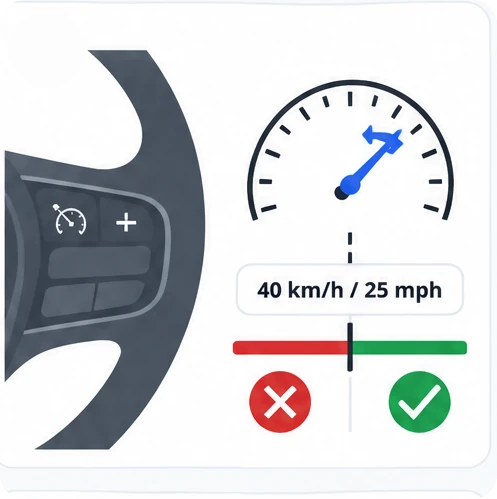
Standard cruise control can be used from about 40 km/h (25 mph). Adaptive cruise and lane centring depend on equipment; only switch a system on when the road and weather are suitable, and keep your hands on the wheel.
Quick Reference
Scroll the table sideways.
Section
In short
Driving and manoeuvring aids - General recommendations
Your responsibilities, legal rules and keeping sensors clear
Speed limiter
Stops you exceeding a speed you set
Cruise control
Holds a set speed without the accelerator
Adaptive cruise control
Holds speed and a safe distance to traffic
Lane positioning assist
Steers to keep your chosen position in lane
Semi-automatic lane changing
Changes lane for you on eligible roads
Active Safety Brake with Collision Risk Alert and Intelligent emergency braking assistance
Warns of collisions and brakes automatically
Lane keeping assist
Corrects unintended drifting out of your lane
Driving and manoeuvring aids - General recommendations
Driving and manoeuvring aids can never replace your own vigilance. You must follow the Highway Code, stay in control of the car at all times and be able to take back control whenever needed. Adapt your speed to the weather, the traffic and the state of the road, and remember that these systems cannot overcome the laws of physics.
Before you signal and change lanes, it is your job to watch the traffic, judge the distance and speed of other vehicles and anticipate what they will do.
Driving aids: hold the steering wheel with both hands, always use the door and interior mirrors, keep your feet close to the pedals and take a break every 2 hours.
Manoeuvring aids: always check around the car before and during the whole manoeuvre, especially using the mirrors.
To comply with European regulations and for safety reasons, you cannot partially or totally deactivate these functions:
Speed Limit Information in the Road signs recognition system.
Active Safety Brake/Collision Risk Alert.
Lane keeping assist.
Driver Attention Warning by Camera.
Parking sensors.
Radars: dirt (such as mud or ice), poor weather (such as heavy rain or snow), labels or objects covering the detection zone, or damaged bumpers can affect the radars and the functions that use them. Do not cover the detection zones on the front and rear bumpers. If you need a bumper repainted, contact a PEUGEOT dealer or a qualified workshop, because certain types of paint can interfere with the radars.
Driving aids camera: the camera and its functions can be impaired or stop working if the windscreen area in front of it is dirty, misty, frosty, covered with snow, damaged or masked by a sticker. In humid and cold weather, demist the windscreen regularly.
Speed limiter
The speed limiter stops your 3008 from going faster than the speed you set. You switch it on manually, the minimum speed setting is 19 mph (30 km/h), and the setting stays in the memory when you switch off the ignition.
The steering-mounted controls are:
1: Speed limiter selection.
2: Switch on or pause the speed limiter at the previously saved speed setting.
3: Increase the speed setting.
4: Decrease the speed setting.
5: Activate the speed limiter at the previously saved speed setting, or use the speed suggested by the Road signs recognition function.
On the instrument panel you will see the speed limiter mode indication (6), the on (green) or paused (grey) indication (7), the speed setting value (8) and, depending on version, the speed suggested by Road signs recognition (9).
Select: press 1-LIMIT to select speed limiter mode. The function is paused (grey).
Switch on: if the most recent speed setting suits you, press 2-II> or 5-OK. The display turns green.
Pause: press 2-II> again to pause the function temporarily.
If the speed setting stays below your car's speed for a long time, you will hear an audible warning.
You do not need to switch the speed limiter on to set the speed. To change the setting from your current speed:
For steps of +/- 1 mph (1 km/h), make short presses on 3 to increase or 4 to decrease.
For steps of +/- 5 mph (5 km/h), press and hold 3 to increase or 4 to decrease.
When the function is active, you can also use the speed suggested by Road signs recognition. As you pass the sign, press 5-OK and the suggested speed becomes the new setting straight away. After you have passed the sign, press 5-OK, wait for "OK?" to appear, then press 5-OK again to save it.
To exceed the setting for a moment, press the accelerator pedal fully down. The speed limiter is deactivated temporarily and the displayed speed setting flashes.
Cruise control
Cruise control keeps your 3008 at the speed you set without you using the accelerator pedal. You switch it on manually and it needs a minimum speed of 25 mph (40 km/h). With an automatic gearbox, mode D or second gear or higher in mode M must be engaged. With a drive selector, mode D must be engaged.
On engines with Stop & Start, cruise control stays active after a gear change. Switching off the ignition cancels any speed setting.
The steering-mounted controls are:
1: Cruise control selection.
2: Switch on or pause cruise control at the previously saved speed setting.
3: Increase the speed setting (if cruise control is active), or start activation (if it is not).
4: Decrease the speed setting (if cruise control is active), or start activation (if it is not).
5: Start activation, or use the speed suggested by the Road signs recognition function.
The instrument panel shows the mode indication (6), on (green) or paused (grey) (7), the speed setting (8) and, depending on version, the speed suggested by Road signs recognition (9).
Select: press 1-ASSIST to select cruise control mode. The function is paused (grey).
Activate: when you reach the speed you want, press 3, 4 or 5-OK to activate cruise control and save the speed setting (green).
Pause: press 2-II> to pause the function temporarily.
Resume: press 2-II>, 3, 4 or 5-OK again to reactivate cruise control (green).
Cruise control also pauses when you press the brake pedal, when the ESC system is triggered, when you shift to neutral or engage reverse, or when you use the electric parking brake.
To change the speed setting, cruise control must be active. Make short presses on 3 or 4 for steps of +/- 1 mph (1 km/h), or press and hold 3 or 4 for steps of +/- 5 mph (5 km/h). Holding 3 or 4 for a long time changes your speed very quickly, so set a cruise speed fairly close to your current speed to avoid sudden acceleration or slowing down.
Adaptive cruise control
Adaptive cruise control keeps your 3008 at the speed you set while keeping a safe distance, also set by you, from the vehicle in front. It manages acceleration and deceleration automatically, using a camera at the top of the windscreen and a radar in the front bumper.
Stop function (EAT6 automatic gearbox): the system brakes until the car comes to a complete stop.
Stop & Go function (e-DCS6/7 automatic gearbox or drive selector): the system brakes to a complete stop and restarts the car.
The brake lamps come on when the system slows the car, and the system does not work if a brake lamp has failed. It is designed mainly for main roads and motorways and only works with moving vehicles travelling in the same direction as you. If you signal to overtake a slower vehicle, the system may briefly reduce the distance to it to help you overtake, without going above your speed setting.
Extra controls on this version include confirming a restart after an automatic stop with 2 (Stop & Go versions) and showing and setting the distance to the vehicle in front with 6. The instrument panel also shows when the car is held stationary, the distance setting and the position of the vehicle detected.
Select: with the engine running, press 1-ASSIST repeatedly until cruise control mode appears on the instrument panel.
Wait: after a few seconds the mode is selected. The Driving aids area shows in grey and cruise control is ready.
Activate: when "OK?" appears, press 3, 4 or 5-OK. Your current speed becomes the speed setting (minimum 19 mph (30 km/h)) and the display turns green.
To switch on, your speed must be between 0 and 112 mph (0 and 180 km/h) with an automatic gearbox or drive selector. You also need:
The driver's door closed.
The driver's seat belt fastened.
Mode D selected on the automatic gearbox.
The parking brake released.
The brake pedal pressed, if the car is stationary.
Change the speed setting with short presses on 3 or 4 for steps of +/- 1 mph (1 km/h), or press and hold them for steps of +/- 5 mph (5 km/h). Holding 3 or 4 for a long time changes your speed rapidly. You can also save the speed suggested by Road signs recognition with 5-OK, the same way as for the speed limiter.
To pause, press 2-II> or the brake pedal. The system also pauses if ESC is triggered, you shift to neutral or reverse, use the electric parking brake, unfasten your seat belt or open the driver's door. Press 2-II> or 5-OK to reactivate it. If the system has brought you to a complete stop and traffic does not allow you to move off within 3 seconds, press 2-II> or the accelerator pedal to move off. Cruise control stays active after a gear change.
Lane positioning assist
Lane positioning assist identifies the edges of your lane and steers the car to keep it in the lane, at the side position you choose. It uses a camera on the upper part of the windscreen and is best suited to motorways and main roads.
The system switches on automatically when you select Drive Assist Plus mode. Steering wheel and side line symbols appear on the instrument panel, and their colour shows whether the system is paused (a condition is not met), active or has a malfunction. To stop using it for a while, press ASSIST again: the Driving aids area disappears from the instrument panel. The system status is saved when you switch off the ignition.
The system works when:
Adaptive cruise control is active.
The ESC system is operational.
The ASR system is activated.
No trailer is detected.
No 'space-saver' spare wheel is in use.
The car is not subject to strong lateral acceleration.
The direction indicators are off when the system is activated.
When regulation is active, the symbols are green and the system uses small steering inputs to keep you in your chosen position, which is not necessarily the centre of the lane. You will feel movements in the steering wheel, and you must hold it properly. To change position, steer and hold the new position until the system takes it into account. If your chosen position is too far off centre, the system may re-centre the car automatically.
Act promptly if the traffic or road surface needs you to take over: moving the steering wheel suspends the system temporarily. Pressing the brake pedal in a way that pauses adaptive cruise control also pauses this system. If you do not hold the wheel firmly enough, the system gives a series of gradual alerts, then deactivates itself if you do not respond. In that case, press ASSIST again to reactivate it. An automatic suspension, for example when ESC is triggered, comes with a specific audible signal.
Semi-automatic lane changing
With Drive Assist Plus 2.0, this system helps you change lanes. It uses the camera at the top of the windscreen, the front radar and the four angle radars in the bumpers. The steering wheel has hands-on detection to stop you being distracted, and you remain responsible for your driving: watch your surroundings and keep your hands on the wheel. Act promptly by moving the steering wheel if traffic or the road needs you to take over. Using the brake or accelerator pedal in a way that pauses or suspends adaptive cruise control also deactivates the system.
Depending on the situation and version, you select the system by activating Drive Assist Plus 2.0 on an eligible road, by pressing OK when the car suggests it as you arrive on an eligible road while using Drive Assist Plus, or it is selected automatically once the car confirms you are on an eligible road.
The system works when:
You are on an eligible road: separate carriageways with no access for pedestrians and cyclists.
The line between the lanes is clear enough for the system to identify.
The position and speed of other vehicles allow a safe lane change.
Drive Assist Plus 2.0 is activated.
Lane positioning assist is activated.
Your speed is between 43 and 112 mph (70 and 180 km/h).
Signal: switch on the direction indicator on the side you want to move to, with or without passing the resistance point of the stalk.
Check: when "OK?" or, depending on version, an animation appears, check your surroundings.
Confirm: press 2-OK to start the lane change or, depending on version, it starts automatically. "Stay attentive" reminds you that you are still responsible.
Finish: once the lane change is done, Lane positioning assist takes over. If you pushed the stalk beyond the resistance point, pull it back.
You can take back control at any time by switching off the indicator before the car crosses the line, holding the steering wheel firmly or using the pedals.
Active Safety Brake with Collision Risk Alert and Intelligent emergency braking assistance
This system warns you if there is a risk of collision with the vehicle in front, a pedestrian or a cyclist, and slows the car to avoid a collision or reduce its severity. It also takes motorcyclists into account and may react to animals, but animals (especially those smaller than 0.5 m) and objects on the road are not necessarily detected. It combines Collision Risk Alert, Intelligent emergency braking assistance (iEBA) and Active Safety Brake, using a camera at the top of the windscreen and, depending on version, a radar in the front bumper.
The system does not replace your vigilance, and you must keep watching the traffic. When it detects a possible collision, it prepares the braking circuit, which can cause a slight noise and a slight feeling of slowing down.
It needs the brake system working, ASR activated, all seat belts fastened and a steady speed on roads with little or no curve. If its warning lamp comes on without a message, automatic braking is not available because a condition is not met. This is normal and you do not need a workshop.
Deactivate the system in the driving aids touch screen application whenever automatic braking could be a risk with the ignition on, for example:
Carrying long objects on roof bars.
Using an automatic car wash.
Doing maintenance, such as changing a wheel or working in the engine compartment.
Placing the car on a rolling bench in a workshop.
Towing the car.
After windscreen damage close to the camera.
The system switches off automatically if it detects a spare wheel that is too small, a fault with the brake pedal switch or a brake lamp, a fault in the sensors, electronics or brakes, a trailer on the equipped hitch, or a severe crash. Performance can be reduced or unavailable with dirty or covered sensors, a damaged or smeared windscreen, a damaged bumper, a misplaced camera, brakes cooling down, curves, after a battery disconnection, glare, bad weather or spray. Other vehicles close ahead, poor or changing light, wet reflective roads, winding, hilly or banked roads and vehicle modifications such as tyres can also affect it. No message appears when conditions reduce detection. Driving with faulty brake lamps can be dangerous, and do not overload the car beyond the GVW, GTW and roof bar load height limits.
To change how early Collision Risk Alert warns you, go to Functions>Automatic Braking System in the ADAS touch screen application and choose "Far", "Medium" or "Near". Your choice is memorised when you switch off the ignition. Alert levels depend on the risk and your chosen threshold. Level 1 is a visual alert only, with the message "Vehicle close".
Lane keeping assist
Lane keeping assist corrects your trajectory and alerts you as soon as it detects a risk of drifting out of your lane unintentionally or, depending on version, crossing a verge or hard shoulder. It uses a camera on the upper part of the windscreen and is most useful on motorways and main roads.
By law, you can only deactivate it in the vehicle personalisation until the next time you switch on the ignition. It switches on automatically every time you start the engine. If a correction lasts more than 10 s, you get a message and an audible signal, and if you still cannot keep the car in lane, the correction stops shortly after. Depending on version, only Lane departure warning is active if there is a fault, a spare wheel is used, ESC is not activated or a trailer is attached.
The system works when:
Your speed is between 40 and 112 mph (65 and 180 km/h).
The road has a central dividing line.
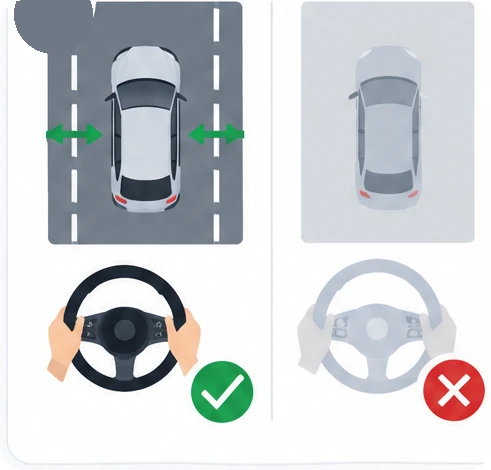
You hold the steering wheel with both hands.
The direction indicators are off when the system activates.
ESC is activated and operational.
The system does not manage your distance, speed or braking. Keep both hands on the wheel so you stay in control when it can no longer help, such as when the central line disappears.
When it corrects your trajectory, you will feel the steering wheel turn and the warning lamp flashes. You can prevent a correction by holding the wheel firmly, and it stops immediately if you use the direction indicators. No correction happens while the indicators are on or for a few seconds afterwards. If the system decides a correction is not enough to avoid crossing a solid line, it shows "Hold the steering wheel" or "Stay in lane" (depending on version). If you are not holding the wheel properly, an audible warning sounds that gets longer with repeated corrections and can become continuous until you respond.
The system goes into standby if ESC is off or triggered, below 40 mph (65 km/h) or above 112 mph (180 km/h), with a trailer connected, a "space-saver" spare wheel (deactivate the system, as detection is not immediate), dynamic driving or pedal pressure, driving over lines, using the indicators, cutting the inside line or tight bends, driver inactivity during a correction, or a narrow lane. Poor contrast at the road edge, worn, hidden or multiple markings, being close to the vehicle in front and narrow or winding roads can also stop it working.
Deactivate it when changing a wheel or working near one, towing or using a bike carrier on a towing device, on poor, unstable or slippery roads, in bad weather, on racing circuits or on a rolling road. You do this in the ADAS touch screen application or the Shortcuts for driving aids, and an indicator lamp on the instrument panel confirms it.
Frequently Asked Questions
Can I turn off Lane keeping assist permanently on my Peugeot 3008?
No. Because of legal requirements you can only deactivate it in the vehicle personalisation until the next time you switch on the ignition, and it switches back on at every engine start.
What is the minimum speed for cruise control on the Peugeot 3008?
Standard cruise control needs a minimum speed of 25 mph (40 km/h). With adaptive cruise control, the minimum speed setting is 19 mph (30 km/h).
How do I go faster than the speed limiter setting?
Press the accelerator pedal fully down. The speed limiter is deactivated temporarily and the displayed speed setting flashes.
Why does adaptive cruise control not work on my 3008?
Check that the driver's door is closed, your seat belt is fastened, mode D is selected, the parking brake is released and, if stationary, the brake pedal is pressed. The system also does not work if a brake lamp has failed.
The driving aids on your Peugeot 3008 can take some of the effort out of long journeys, but you are always the one in charge. Keep the camera area and bumpers clean, know how to pause each system, and ask a PEUGEOT dealer or a qualified workshop for full details.
Don't forget to follow us on Instagram for more Peugeot guides!
This is an independent guide, not an official Peugeot publication. If in doubt, contact a PEUGEOT dealer or a qualified workshop before carrying out any work.
Hello and welcome. In this article we look at the 12 V battery on the Peugeot 3008 II (2016-present). We will cover jump starting, charging with a battery charger, and disconnecting and reconnecting t
Hello and welcome. In this article we look at tyre pressures and the under-inflation detection system on the Peugeot 3008 II (2016-present). We will cover how the system works, what to do when the ale
Hello and welcome. In this article we look at the technical specifications of the Peugeot 3008 II (2016-present). We will cover engine figures, towed loads, hybrid motor and battery details, and where