Peugeot 408 Fuse Box and Fuses (2022-2026)
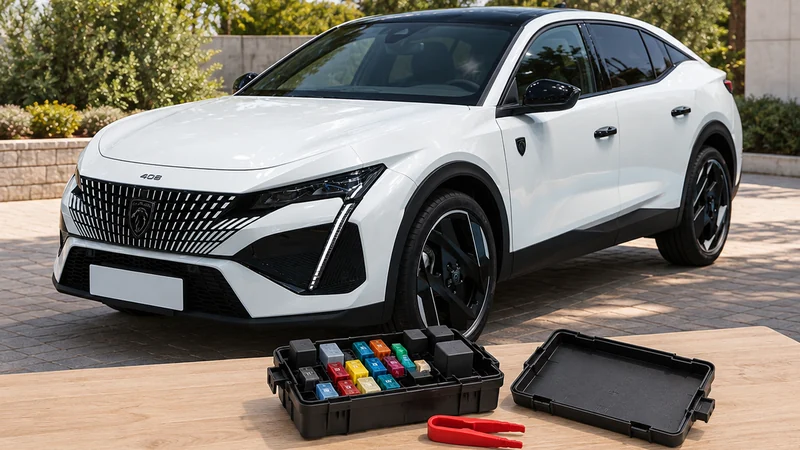
Hello and welcome. In this article we look at the fuses on the Peugeot 408 I (2022-2026). We will cover who should change a fuse and what to know before adding extra electrical equipment to the car.
How the Peugeot 408 driver assistance systems work: speed limiter, cruise control, adaptive cruise, lane keeping assist and Active Safety Brake.
Hello and welcome. In this post, we'll look at the driver assistance systems on the Peugeot 408 I (2022-2026). Your Peugeot 408 has a range of driving aids that help you control your speed, keep a safe distance, stay in your lane and avoid collisions. We'll cover what each system does, how to switch it on and adjust it, and the conditions it needs to work properly. These systems help you, but they never replace your own attention at the wheel. Some systems and functions depend on the version or equipment fitted, so your 408 may not have all of them.
Only temporarily. You can deactivate it in the vehicle personalisation, but it switches back on by default every time you start the engine.
Scroll the table sideways.
| Section | In short |
|---|---|
| Driving and manoeuvring aids - General recommendations | Driver stays responsible, some aids cannot be switched off |
| Speed limiter | Stops the car exceeding your chosen speed |
| Cruise control | Holds your chosen speed without the accelerator |
| Adaptive cruise control | Holds speed and keeps a set distance |
| Lane positioning assist | Steers to keep your chosen position in lane |
| Active Safety Brake with Collision Risk Alert and Intelligent emergency braking assistance | Warns of collisions and brakes automatically |
| Lane keeping assist | Corrects your path if you drift from lane |
| Lane departure warning | Warns you when leaving your lane unintentionally |
Driving and manoeuvring aids can never replace your own vigilance. You must follow the Highway Code, stay in control of the car at all times and be ready to take back control whenever needed.
To comply with European regulations and for safety reasons, you cannot partially or totally deactivate these functions:
Radar(s): dirt such as mud or ice, poor weather such as heavy rain or snow, stickers or other objects over the detection zone, or damaged bumpers can affect the radar and its functions. Do not cover the detection zones on the front and rear bumpers. If either bumper needs repainting, contact a PEUGEOT dealer or a qualified workshop, because certain types of paint could interfere with the radar.
Driving aids camera: the camera and its functions may be impaired or stop working if the windscreen in front of it is dirty, misty, frosty, covered with snow, damaged or masked by a sticker. In humid and cold weather, demist the windscreen regularly. Poor visibility (inadequate street lighting, heavy rain, thick fog, snowfall) and dazzle (oncoming headlamps, low sun, reflections on a damp road, leaving a tunnel, alternating shade and light) can also reduce detection performance.
The speed limiter stops your car from going faster than the speed you have programmed (the speed setting). You switch it on manually.
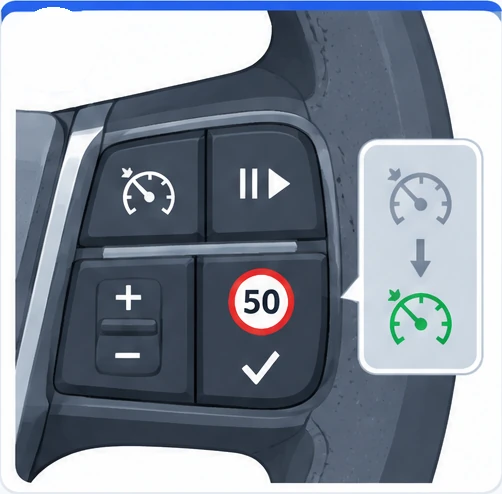
The steering-mounted controls and instrument panel displays are as follows:
Scroll the table sideways.
| Number | Function |
|---|---|
| 1 | Speed limiter selection |
| 2 | Switch on/pause the speed limiter at the previously saved speed setting |
| 3 | Increase/Decrease the speed setting |
| 4 | Activate the speed limiter at the previously saved speed setting, or use the speed suggested by the Road signs recognition function |
| 5 | Speed limiter mode selection indication |
| 6 | Speed limiter on (green)/pause (grey) indication |
| 7 | Speed setting value |
| 8 | Speed suggested by the Road signs recognition function (depending on version) |
To switch the speed limiter on or pause it:
If the speed setting stays below the car's speed for a prolonged period, you will hear an audible warning.
You do not need to switch the speed limiter on to set the speed. Starting from the car's current speed:
When the function is active, you can use the speed suggested by Road signs recognition on the instrument panel:
To go over the speed setting temporarily, fully depress the accelerator pedal. The speed limiter is temporarily deactivated and the speed setting flashes. Release the pedal to drop back below the speed setting. If you go over the speed without pressing the accelerator, for example on a steep slope, an audible signal sounds immediately.
Cruise control keeps the car at your programmed speed without you using the accelerator pedal. You switch it on manually.
Scroll the table sideways.
| Number | Function |
|---|---|
| 1 | Cruise control selection |
| 2 | Switch on/pause cruise control at the previously saved speed setting |
| 3 | Increase/Decrease the speed setting (if cruise control is activated), or start activation (if cruise control is deactivated) |
| 4 | Start activation, or use the speed suggested by Road signs recognition |
| 5 | Cruise control mode selection indication |
| 6 | Cruise control on (green)/pause (grey) indication |
| 7 | Speed setting value |
| 8 | Speed suggested by the Road signs recognition function (depending on version) |
Cruise control also pauses when you press the brake pedal, when you shift to neutral or engage reverse, when you use the electric parking brake, or automatically if the ESC system is triggered.
To change the speed setting, cruise control must be active. Starting from the current speed, make successive short presses upwards/downwards on 3 for steps of +/- 1 mph (1 km/h), or press and hold for steps of +/- 5 mph (5 km/h). Holding 3 for a long time changes the car's speed very quickly, so set a cruise speed fairly close to your current speed to avoid sudden acceleration or deceleration.
Adaptive cruise control holds your speed setting while keeping the safety distance you have chosen from the vehicle in front (the target vehicle). It manages acceleration and deceleration for you. With the Stop & Go function, it can brake the car to a complete stop and move off again.
Scroll the table sideways.
| Number | Function |
|---|---|
| 1 | Select/deselect cruise control only or Drive Assist Plus (depending on version) |
| 2 | Switch on/pause cruise control at the previously saved speed setting, or confirm restart after an automatic stop (Stop & Go) |
| 3 | Increase/Decrease the speed setting (if activated), start activation (if deactivated), display and set the inter-vehicle distance |
| 4 | Start activation, or use the speed suggested by Road signs recognition |
| 5 | Cruise control activated (green)/paused (grey) |
| 6 | Speed setting value |
| 7 | Speed suggested by the Road signs recognition function |
| 8 | Vehicle held stationary (Stop & Go version) |
| 9 | Inter-vehicle distance setting |
| 10 | Position of the vehicle detected by the system |
To switch on, the car's speed must be between 0 and 112 mph (0 and 180 km/h), and all of these conditions must be met:
To change the speed setting, make successive short presses upwards/downwards on 3 for steps of +/- 1 mph (1 km/h), or press and hold for steps of +/- 5 mph (5 km/h). Holding 3 for a long time changes the speed rapidly. You can also use the speed suggested by Road signs recognition: press 4-OK when passing the sign to save it straight away, or after passing it press 4-OK, wait for “OK?”, then press 4-OK again. If the new speed is far from your current speed, you will feel strong acceleration or deceleration.
To pause the system, press 2-II> or the brake pedal. It also pauses if the ESC system is triggered, if you shift to neutral or reverse, use the electric parking brake, unfasten your seat belt or open the driver's door. Press 2-II> or 4-OK to reactivate it. If reactivation is not possible, the message “Activation not possible, conditions not met” is shown briefly. Cruise control stays active after a gear change.
If the system has braked the car to a complete stop and traffic does not let you move off within 3 seconds, press 2-II> or the accelerator pedal to move off.
Lane positioning assist identifies the edges of the lane and steers the car to keep it in the lane, at the side position you have chosen. It uses a camera on the upper part of the windscreen and is best suited to motorways and main roads.
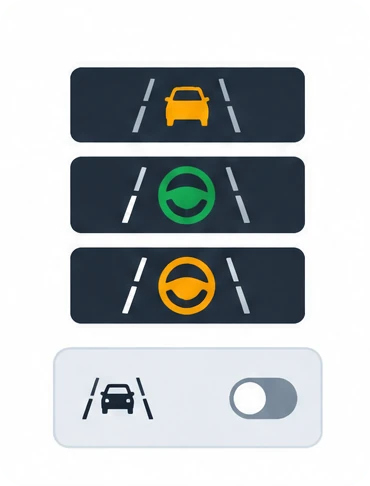
The system switches on automatically when you select Drive Assist Plus mode. Steering wheel and side line symbols on the instrument panel confirm this, and their colour shows the system status:
To switch it off for a while, press the ASSIST button again. The Driving aids mini-view disappears from the instrument panel. The system status is saved when you switch off the ignition.
The system needs all of these operating conditions:
You must hold the steering wheel properly. When the symbols are green, the system makes small steering inputs to keep the car in your chosen position, which is not necessarily the centre of the lane, and you can feel the wheel moving. To change position, steer and hold the new position until the system takes it into account. If the chosen position is too far off-centre, the system may re-centre the car automatically.
Act promptly if traffic or the road surface needs you to take over: moving the steering wheel suspends the system temporarily, and any brake pedal press that pauses adaptive cruise control also pauses this system. If you are not holding the wheel firmly enough, the system gives a series of gradual alerts, then switches itself off if you do not respond. In that case, press the ASSIST button again to reactivate it.
A specific audible signal sounds when the system suspends itself, for example if the ESC system is triggered or the lane is not detected well enough. In that second case, Lane keeping assist can take over, and the system comes back on once conditions are met again. The system is also paused if you drive outside the lane limits, grip the wheel too tightly or make a dynamic steering movement.
This system warns you if there is a risk of collision with the vehicle in front, a pedestrian or a cyclist, and reduces your speed to avoid a collision or limit its severity. It also takes motorcyclists into account and may react to animals, but animals (especially those smaller than 0.5 m) and objects on the road are not necessarily detected.
It combines three functions: Collision Risk Alert, Intelligent emergency braking assistance (iEBA) and Active Safety Brake (automatic emergency braking). It uses a multifunction camera at the top of the windscreen and, depending on version, a radar in the front bumper. The system assists you, but you remain responsible for watching the traffic at all times. When it detects a possible collision, it prepares the braking circuit, which can cause a slight noise and a slight feeling of deceleration.
The system needs these operating conditions:
If its warning lamp comes on without a message, automatic braking is not available because a condition is not met. This is normal and does not need a workshop.
With the ignition on, deactivate the system in the driving aids touch screen application whenever automatic braking could be a risk, for example:
The system switches itself off if a spare wheel with too small a diameter is detected, if there is a fault with the brake pedal switch or the right or left brake lamp, if a fault is found in the sensors, electronics or brake system, if the towbar (with an electrical connection plug) detects a trailer, or after a severe crash such as one where airbags deploy.
Performance may be reduced or unavailable if:
Performance may also be affected by the stability system working, battery voltage out of range, a wet road reflecting lights, close vehicles ahead, tractors, muddy vehicles or vehicles with a trailer, banked, winding or hilly roads, poor lighting, sudden lighting changes and vehicle modifications such as tyres. When detection is reduced or briefly unavailable because of conditions like these, no message is shown, because you do not need to do anything.
Driving with brake lamps that are not working perfectly can be dangerous. Do not overload the car: keep within the GVW and GTW limits and the load height limits for roof bars.
Collision Risk Alert: this warns you of a risk of collision with the vehicle in front, a pedestrian or a cyclist. To change how early it warns you, go to the ADAS touch screen application, select Functions>Automatic Braking System, and choose one of the 3 preset thresholds: “Far”, “Medium” or “Near”. Your choice is kept when you switch off the ignition.
The alert takes into account the car's dynamics, the speed difference with the object, and what you are doing with the pedals and steering wheel. The levels are:
Scroll the table sideways.
| Level | Alert | Message |
|---|---|---|
| 1 | Visual only: the vehicle in front is very close | “Vehicle close” |
| 2 | Visual and audible: a collision is imminent | “Brake!” |
| 3 | A micro-braking may be given, confirming the risk (optional) | None |
If you approach a vehicle too quickly, the level 2 alert may appear straight away. The level 1 alert depends on the threshold you chose, reacts only to moving vehicles and switches off automatically at lower speed. Warnings may not be given, may come too late or may seem unjustified, so always stay in control and be ready to react.
Lane keeping assist corrects your car's path when it detects a risk of drifting out of your lane unintentionally, or crossing a verge or hard shoulder (depending on version). It uses a camera on the upper part of the windscreen that identifies lane markings and, depending on version, the side of the road. It is particularly useful on motorways and main roads.
Because of legal requirements, you can only deactivate the system in the vehicle personalisation, and only until the next time you switch the ignition on. It comes back on by default every time you start the engine. You must deactivate it when the car is being towed. Depending on version, only Lane departure warning stays active if there is a system fault, a spare wheel is in use, ESC is not activated or a trailer is attached.
The system needs these operating conditions:
The system only helps if the car risks wandering from its lane unintentionally. It does not manage your safe distance, speed or braking. Keep both hands on the wheel so you stay in control if conditions no longer allow it to work, for example if the central line disappears.
When it detects a risk of crossing a lane marking or lane boundary such as a grass verge, it steers the car back into its original lane. You will feel the steering wheel turn, and the warning lamp flashes during the correction. You can override it by holding the wheel firmly, for example in an emergency manoeuvre. The correction stops immediately if you use the direction indicators, and no correction happens while they are on and for a few seconds after you switch them off.
If a correction lasts more than 10 s, you get a message and an audible signal. If you still cannot keep the car in the lane, the correction stops after a short time. If hands-off driving is detected during a correction within a rolling interval of 180 seconds, the system responds as follows:
The table below shows the system status in different situations. The actual order of the alerts may differ.
Scroll the table sideways.
| Function status | Comments |
|---|---|
| OFF | Function deactivated. |
| ON | System active, conditions not met: speed below 40 mph (65 km/h), no lane marking recognised, ESC operation triggered, or dynamic driving style. No display. |
| ON | Automatic deactivation/standby, for example a trailer is detected, the 'space-saver' spare wheel supplied with the car is in use, or there is a failure. |
| ON | Lane marking detected and speed above 40 mph (65 km/h). No display. |
| ON | The system corrects the path on the side where it detects the risk of crossing the line. Your hands are on the steering wheel. |
Lane departure warning helps you avoid leaving your lane by accident. The front camera watches the road edges and lane markings, and warns you if the car crosses one. When it recognises an unintended lane departure, the indicator flashes yellow rapidly.
As with Lane keeping assist, legal requirements mean you can only deactivate it in the vehicle personalisation until you next switch the ignition on, and it comes back on by default each time you start the engine. You must deactivate it when the car is being towed. It is a driving aid and never replaces your own vigilance.
For the system to work correctly:
Activation: when the system is on, the LED in the button is not lit. To switch it on, press the button. Depending on version, it switches back on automatically the next time you start the car.
Deactivation: press and hold the button. The LED in the button lights up and a yellow indicator shows on the instrument panel.
Performance may be affected by a camera covered with snow, ice, slush, mud or dirt, windscreen damage or items such as stickers, close vehicles ahead, banked, winding or hilly roads, poor lighting, sudden lighting changes, sun shining directly into the camera lens, heavy rain, fog or snow, vehicle modifications such as tyres, and roads with poor lane markings.
If the warning lamp comes on with the message “Audible Warning System fault: Repair needed”, the audible warning system has failed and the system may be disturbed or unavailable. If the warning lamp appears with a message and an audible signal, there is a malfunction. In both cases, have it checked by a PEUGEOT dealer or a qualified workshop.
Only temporarily. Because of legal requirements, you can deactivate it in the vehicle personalisation, but it switches back on by default every time you start the engine.
All activation conditions must be met: driver's door closed, driver's seat belt fastened, mode D selected, parking brake released and, if stationary, brake pedal pressed. If reactivation is not possible, the message “Activation not possible, conditions not met” is shown briefly.
Standard cruise control needs a minimum speed of 25 mph (40 km/h). With adaptive cruise control, the minimum speed setting is 19 mph (30 km/h).
Yes. The speed limiter keeps its speed setting in memory when you switch off the ignition, unlike cruise control, which cancels the setting.
The driving aids on your Peugeot 408 can make long journeys easier and help keep you safe, but they only work well when you understand their limits. Keep the windscreen and bumpers clean, stay alert with both hands on the wheel, and for full details on any system, ask a PEUGEOT dealer or a qualified workshop.
If a driving aid lamp lights up, check our guides to the Peugeot 408 orange warning lights, the Peugeot 408 green and blue indicator lamps and the Peugeot 408 red warning lights.
Don't forget to follow us on Instagram for more Peugeot guides!
This is an independent guide, not an official Peugeot publication. If in doubt, contact a PEUGEOT dealer or a qualified workshop before carrying out any work.
Related guides: Peugeot 408 model guides.
Cover adapted from a photograph by Alexander-93 — Wikimedia Commons, CC BY-SA 4.0 (AI edited).
Hello and welcome. In this article we look at the fuses on the Peugeot 408 I (2022-2026). We will cover who should change a fuse and what to know before adding extra electrical equipment to the car.
Hello and welcome. In this article we look at the tyre under-inflation detection system on the Peugeot 408 I (2022-2026): how it works, what to do when the alert comes on, how to reinitialise it and w
Hello and welcome. In this post we cover the lights on the Peugeot 408 I (2022-2026). We'll look at caring for the headlamp lenses, which LED lamps need a professional, the front and rear lamp layouts